Quest list
- Trader filter
- Search and filter chips
- Mod filter
- Vanilla quests a mod overrides
- Sorting
- Compact tags
- Deep links
Trader filter
Pick a trader from the avatar row to see only their quests. Mod-added traders are listed too.

Search and filter chips
Search by quest name, and narrow the list with the Vanilla / Mod and BEAR only / USEC only chips.

Mod filter
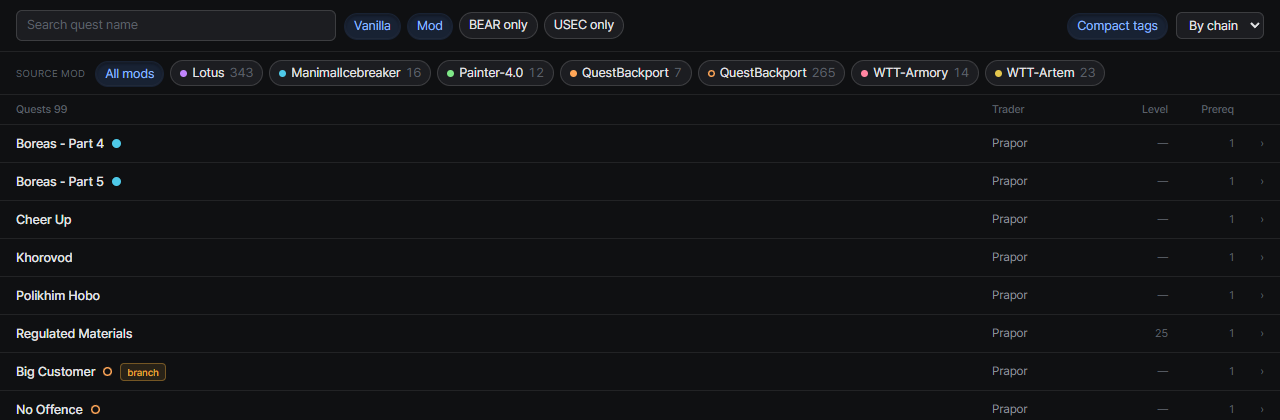
When your server has mod quests and the Mod chip is on, a Source mod row appears under the filter bar. Mods often add quests to vanilla traders, so this is the quickest way to see everything one mod added.
- Pick one or more mods. All mods clears the selection
- It combines with the trader filter, and the trader row recounts for the selected mods
- Chip dots use the same colors as the mod tags in the list

Vanilla quests a mod overrides
Some quest mods replace the files of vanilla quests instead of adding new ones. Those quests stay vanilla, but they carry the mod’s name in a tag with a dashed outline, in the wiki and on the progress pages.
- The mod gets its own chip in the Source mod row, with a hollow dot, so you can list every quest it overrides
- The expanded quest’s meta line reads Vanilla quest overridden by a mod
Sorting
- By chain (default): prerequisites always sit above the quests they unlock
- By level
- By name
Compact tags
The Compact tags button left of the sort menu shrinks each mod name tag into a colored dot, so long mod names don’t crowd the quest names.
- Dots use the same colors as the Source mod chips; overridden vanilla quests get a hollow dot
- Hover a dot to see the mod name
- The wiki and the progress quest list each remember their own setting
Deep links
?quest=<questId> opens a specific quest directly, so you can bookmark or share a quest.